

SCRIPTS
Creating accounts using Perl:
This tutorial will go over some of the details for a perl script that will help us create bulk accounts for a Linux system. The script is non-interactive and it sources its input to create accounts from a data file. You must be root in order to run/create accounts.
In order to continue here is what is needed:
1. Computer running Linux such as Redhat, CentOS, Debian etc.
2. A data directory such as /root /scripts/data
3. A data file that is CSV (comma separated values)
Since step one is pretty
obvious, let’s move to step 2. Create a directory within your home path that is
similar to this one:

Download
the user create perl script here
Move
the user_create_j_r.pl
script to the /root/scripts/ directory.
Creating the User data file:
Change directory to
/root/scripts/data

Create a file called users.data
and type the users accounts to be created:

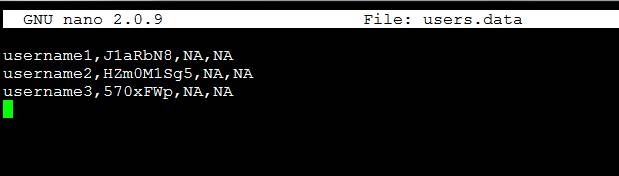
Do a CTRL+O to save and CRTL+X to exit
The first
field is the user ID, the second field is the Password the last
two fields marked NA are specific for future application.
Go
back to the scripts

Let’s view and edit the user_create_j_r.pl
script
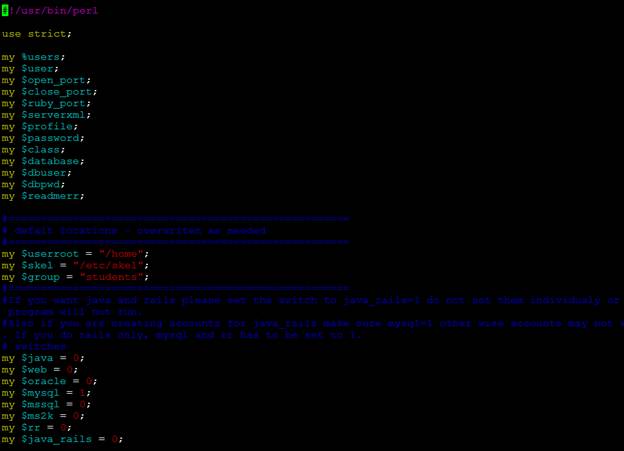
Though this script is designed for an advance
environment we can still use some components to create basic Linux
accounts.
#!/usr/bin/perl
use strict;
my %users;
my $user;
my $open_port;
my $close_port;
my $serverxml;
my $profile;
my $password;
my $class;
#=====================================================
# defalt locations - overwriten as needed
#=====================================================
my $userroot =
"/home";
my $skel =
"/etc/skel";
my $group = "students";
#=====================================================
# switches
my $java = 0;
my $web = 1;
my $oracle = 0;
my $mysql = 0;
my $mssql = 0;
my $ms2k = 0;
The parts to pay close attention are highlighted. As we can see we have some defined variables for example:
my $userroot = "/home"; Here we are just defining the root directory for the user accounts on the System
my
$skel = "/etc/skel"; The skel directory
defines any special directories
that need to be copied over when
a new account is created. For example it can include the ‘'public_home'' directory and the ''tomcat ''directory''
my $group =
"students";
It
defines the group ID
The second part of
the user_create.pl script
defines what we call switches. To enable any particular service listed underneath
this field we need to change the values from a zero to a one. Hence, if we want a web account with tomcat will do:
For this example we only cover the my $web switch all the others ones will be left alone. However, you can study the code and figure out how to implement it in your own environment.
# switches
my $java = 0;
my $web = 0;
my $oracle = 0;
my $mysql = 0;
my $mssql = 0;
my $ms2k = 0;
To
execute the scrip:

More scripts to
add user accounts
Here
are two other scripts that I got from the Redhat to add users accounts. Please
study them on your free time: