As an
outcome we will create a Personal Virtual Assistant
which will be an innovative, inexpensive, reliable and
easy to use virtual secretary. Our friendly system
will identify users without invasion to their privacy
and provide different services. Traditionally visitors
had to deal with the live person which runs a risk of
making mistakes or forgetting something and requires
salary. Our assistant won’t have any of those, and in
addition it will be easy to train by updating the
software. We have drawn our research on previous works
in computer vision, but we have extended it and
combined with important features. The PVA can be
implemented in various fields. For example, in
education, it can be used to organize and ease student
appointments with Deans or Chairs. In business,
offices can use it in instead of a regular secretary.
This assistant will never forget about the meeting and
will never be tired. Those are only the basic features
of the PVA. We are analyzing the required functions
and will add new features accordingly. At the long
term a global network of PVA’s can be created allowing
them to communicate between each other without need
for appearance in person.
The
idea behind the Personal Virtual Assistant (PVA) is
creation of an inexpensive, reliable and easy to use
assistant. PVA will include two digital cameras and a
touch-screen display with the computer on the back
end. PVA will be mounted on the door of the person
whom it will serve. The assistant will identify the
user using the User Identification System (UIS) and
then assist him with a variety of possible solutions.
Such
solutions will include easy access to the supervisor’s
schedule with the option of adding or deleting a
meeting using an easy and friendly user interface. The
visitor will see right away all the available slots
for possible appointments time and would simply be
able to add him to the list. The supervisor will see
all the appointments with important details such as
visitor’s picture, history of previous meetings with
this person, and a short description of current and
past meetings. The schedule will be available online
as well. Both visitors and the supervisor will be able
to cancel the meeting, doing this will automatically
update the schedule and send e-mail to both of them
that meeting was canceled. Both people will be able to
enable the option to get notification of upcoming
meeting by e-mail.
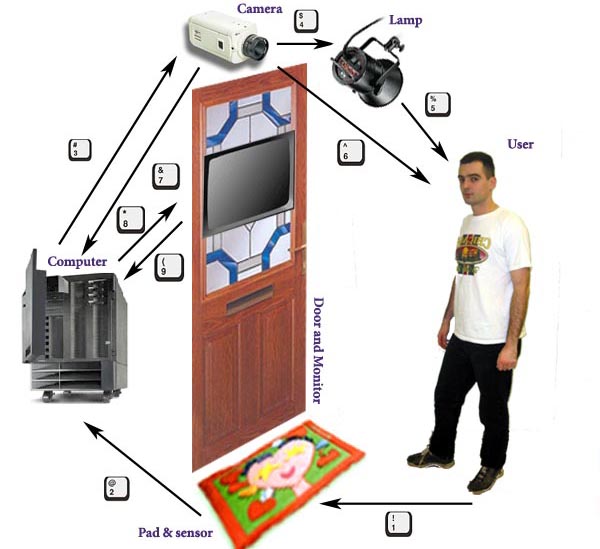
Top
Level diagram of the User Identification System.
Another important task that PVA will include is based
on Video Conference module. In case the boss is out of
his office, but is available over the videoconference
and had enabled this option, the visitor can have a
videoconference with the boss through the PVA.
The
most challenging part of the PVA is the User
Identification module which will identify user by
digital picture pattern comparison. The decision was
to start from doing the User Identification System
module and then integrate it into the Personal Virtual
Assistant.
Identification of a person by image processing and
computer vision has always been a very challenging
task. “Automatic recognition of human faces is one
of the most difficult and important problems in the
areas of pattern recognition and computer vision. As
we know, successful face detection process is the
prerequisite to facilitate later face recognition task.”
[2] This is a very challenging problem because it
requires implementation of several complex
mathematical algorithms of an advanced level. The
probability of identification should be high enough to
eliminate all the possible mistakes.
In our
research we will provide the ability for comparison of
content based images through combination of various
technologies. We are trying to take the Human Computer
Interaction (HCI) to the next level. The main goal of
this project is to make our system friendlier than
others, but in the same time to be as reliable as
possible. We want to create a friendly system which
will identify users without invasion to their privacy
and without any direct input from them. The visitor is
not required to do any kind of action, just to enjoy
that the system is able to recognize him. In similar
systems the user is required to perform some action in
order to be identified, such as enter the username,
punch code, slide card and etc. In our case this step
is eliminated by complexity of hardware and software
interaction. This makes the HCI easier and use of the
system more enjoyable. User won’t forget his card or
his password and still will be identified.
Identification of a visitor, which takes only a couple
of seconds, in practice, involves very long series of
actions and computer operations. First of all the
system, with help of the movement sensor, detects that
there is a visitor. As soon as the user is detected
his height is measured. This is done by the height
measurement sensor that uses technique of similar
triangles. As soon as the height of the visitor is
detected the camera moves to the appropriate height in
order for picture to be more accurate. As soon as it
reaches relevant position, camera takes pictures of
the user.
User identification
is done by a digital picture processing. “Among the
various facial features, eyes and mouth are the most
prominent features for recognition and estimation of
3D head pose. Most approaches for eye localization are
template-based. However, we directly locate eyes,
mouth, and face boundary based on their feature maps
derived from both the luma and chroma of an image. We
consider only the area covered by a
face mask
that is built by enclosing the grouped skin-tone
regions with a pseudo convex hull” [1] There are a
lot of important challenging issues that have to be
solved. Not every one has the same height and some
pictures may result in an image of only hair or only
the neck of the visitor. Also, in the perfect case
when the picture will have exactly users face the
comparison task isn’t easy at all. The person might
have blinked which resulted in a closed eyes or he
could have raised a mustage. All those “small” details
highly increase the difficulty of image comparison. In
our preliminary research we have already solved
several important issues and created a clear path for
the end product.




